

DISKSNAP
Bootable drives and backups for SD cards and USB sticks.
WHAT IT DOES
-
Make Bootable
Write a bootable image to a USB stick or SD card: Linux ISOs like Ubuntu, Raspberry Pi images and Windows 10/11 installers.
-
Backup to .dsnap
Save a whole SD card or USB drive to a compressed
.dsnapfile. Empty, zero-filled space shrinks to almost nothing, and the file can be checked after saving. -
Restore a backup
Write a
.dsnapbackup back onto a drive at least as large as the original. The whole backup is checked before anything is erased. -
Clone
Copy one USB drive or SD card directly to another of the same size or larger. The source is only read; the destination is overwritten after confirmation. Verification is on by default.
-
Works offline
Everything runs on your PC. No account, no cloud, no uploads.
-
Free to use
All four tools are free for personal and business use, with no account, activation or paid unlock.
HOW IT WORKS
-
Plug in
Insert the SD card or USB drive you want to work with.
-
Choose
Pick Backup, Restore, Clone or Make Bootable, then select the source and destination for your task.
-
Snap
DiskSnap checks with you before anything is overwritten, then verifies the result (on by default).
MEET DISKSNAP
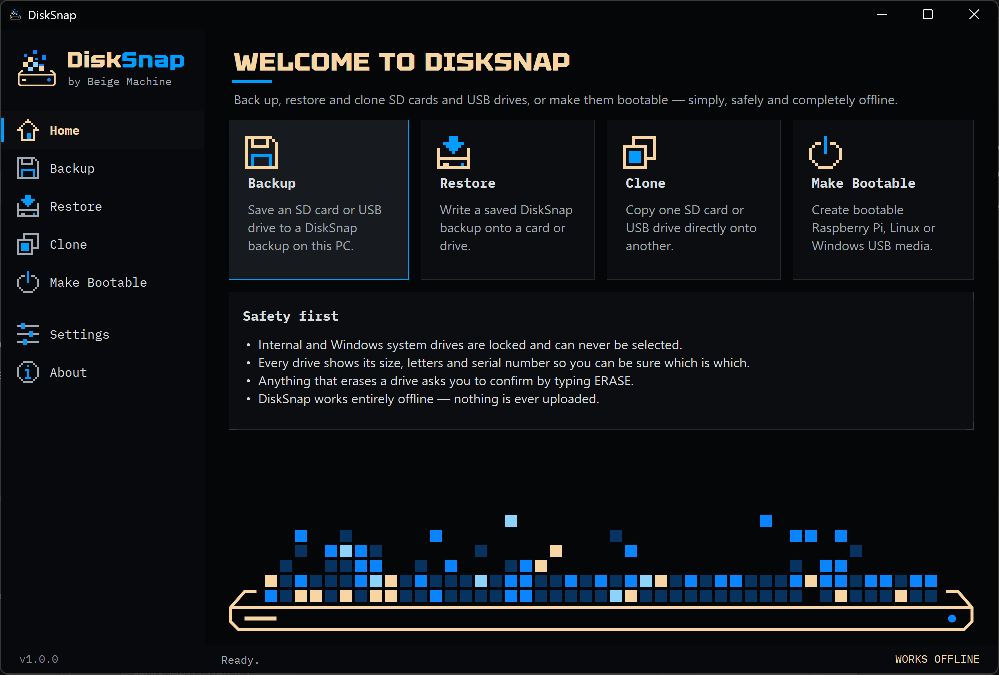
SYSTEM REQUIREMENTS
- A Windows PC with an Intel or AMD 64-bit processor (x64). Use a currently supported Windows 11 edition. This is not an ARM-native or 32-bit build.
- The included .NET 10 runtime also supports certain Windows 10 LTSC/Enterprise editions. Ordinary Windows 10 Home/Pro is outside that support list; compatibility is not a promise of continued support. See Microsoft’s supported Windows versions.
- Administrator permission is needed to install and to perform operations requiring direct drive access.
- A USB drive or SD card and a suitable reader. Internal and Windows system drives cannot be selected.
- Enough space for your backup. A restore or clone target must be at least as large as the original source drive.
- The installer includes .NET 10.0.12; no separate runtime download is required. Drive operations work offline.
Installation and Windows security guidance · Version 1.0.0 release notes
This installer is unsigned. Windows may show an unknown publisher or block it. Do not disable security protections to install it.
DiskSnap for Windows
VERIFY YOUR DOWNLOAD
File: DiskSnap-1.0.0-setup.exe · 35.9 MiB (37,689,920 bytes) · version 1.0.0 · Windows x64 · unsigned. The installer includes Microsoft .NET 10.0.12, so no separate runtime download is needed.
SHA-256:
F9A541FE94E835C4F9FE3F439D48BA981294B5E34AB8B13123FC03D8BDE85381A checksum shows that your copy matches this file; it is not a digital signature. In PowerShell: Get-FileHash -Algorithm SHA256 -LiteralPath 'C:\path\to\DiskSnap-1.0.0-setup.exe'. Read the installation and Windows security guidance before you install. The licence terms, including the bundled Microsoft .NET notices, are shown during Setup and installed with DiskSnap.
The installer is hosted on GitHub Releases, so the Download button takes you to github.com; see the privacy information. The same file and checksum are listed on the DiskSnap 1.0.0 release page on GitHub.
Raspberry Pi is a trademark of Raspberry Pi Ltd. Beige Machine is independent and is not endorsed by Raspberry Pi Ltd.